Simple video editor
ACDSee Video Studio is a multimedia application that makes the video creation process simple without sacrificing functionality. It offers a wide range of tools just like other video editors in the market but displays them in a way that novice users won’t have a hard time understanding. Also worth mentioning is the app’s easy sharing solutions. With ACDSee Video Studio, you can directly upload your videos to video-sharing sites such as Youtube and Vimeo.
Top Recommended Alternative
Video creation made easy
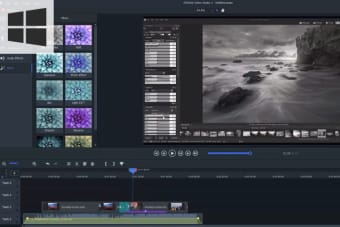
At first glance, ACDSee Video Studio’s screen looks and feels similar to other video-editing software. However, while it is not entirely foreign, the interface is refined and streamlined to avoid confusion. Once launched, you will find the timeline for clips, the preview window, and the menu options displayed in an order that you’ll likely use. To start editing, you need to import your media by clicking the media button. Unlike other similar apps, the only function that utilizes a second window in the app is the previewing media before dragging it to the timeline. With this, you won’t be dealing with a lot of free-floating windows and other pop-up options.
Once the video is in the timeline, you can start your video creation process. This software has the usual editing tools that you may need—including transitions, animations, audio effects, filters, and overlays. There are also little extra flourishes that you can apply, including the behavior, which provides more movement to your video—a hybrid of transitions and animations. The app also offers advanced effects such as color removal, clip speed, and mosaic. On top of that is the Color LUTs option that imports your favorite LUT file or a pre-installed one.
Even though this program prides itself on its simplicity, it does not limit how much you can customize your finished video. With the app, you can control almost everything in your video. You can apply filters and effects in the entire timeline or just part of each clip. Once you are done, you can export your video to practically any size and format, including 4K. As noted, you can upload them to Youtube and Vimeo directly from the app.
Video editor for beginners
Overall, ACDSee Video Studio is a great starting tool for those who are new to video editing. For a fully-functioning video editing suite, the app is refreshingly intuitive and manageable. You will only need a few hours to master how each tool works. It is still not enough to replace Adobe Premiere or Final Cut Pro, but if you want to try editing videos and don’t know where to start, this app can help.